HTML Autocomplete Feature using <datalist> Tag

I am Frontend developer with expertise in HTML , CSS and JavaScript . I have a very Good experience in developing websites using Angular framework , NgRx , RxJs .
My Goal on this platform is to support and help the frontend developers by sharing my knowledge and experience in frontend development.
Use super cool HTML <𝐝𝐚𝐭𝐚𝐥𝐢𝐬𝐭> Tag to implement autocomplete feature in application without using JS code.
The tag specifies a list of pre-defined options for an element. It is used to provide an "autocomplete" feature. It gives auto suggestions from options as per the input values.
The <datalist> element's id attribute must be equal to the <input> element's list attribute (this binds them together).
 <label for="city">Select the City :- </label>
 <input list="cities" name="city" id="city">
 <datalist id="cities">
    <option value="Mumbai">
    <option value="Pune">
    <option value="Delhi">
    <option value="Manipal">
    <option value="Mangaluru">
 </datalist>
Output of above code will be as follows when user input "M" -
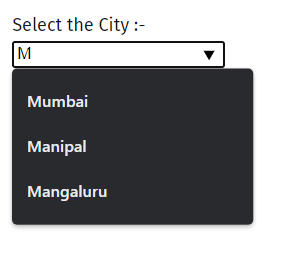
When user search for M the <datalist> will gives the suggestions from options which matches with input string.

